
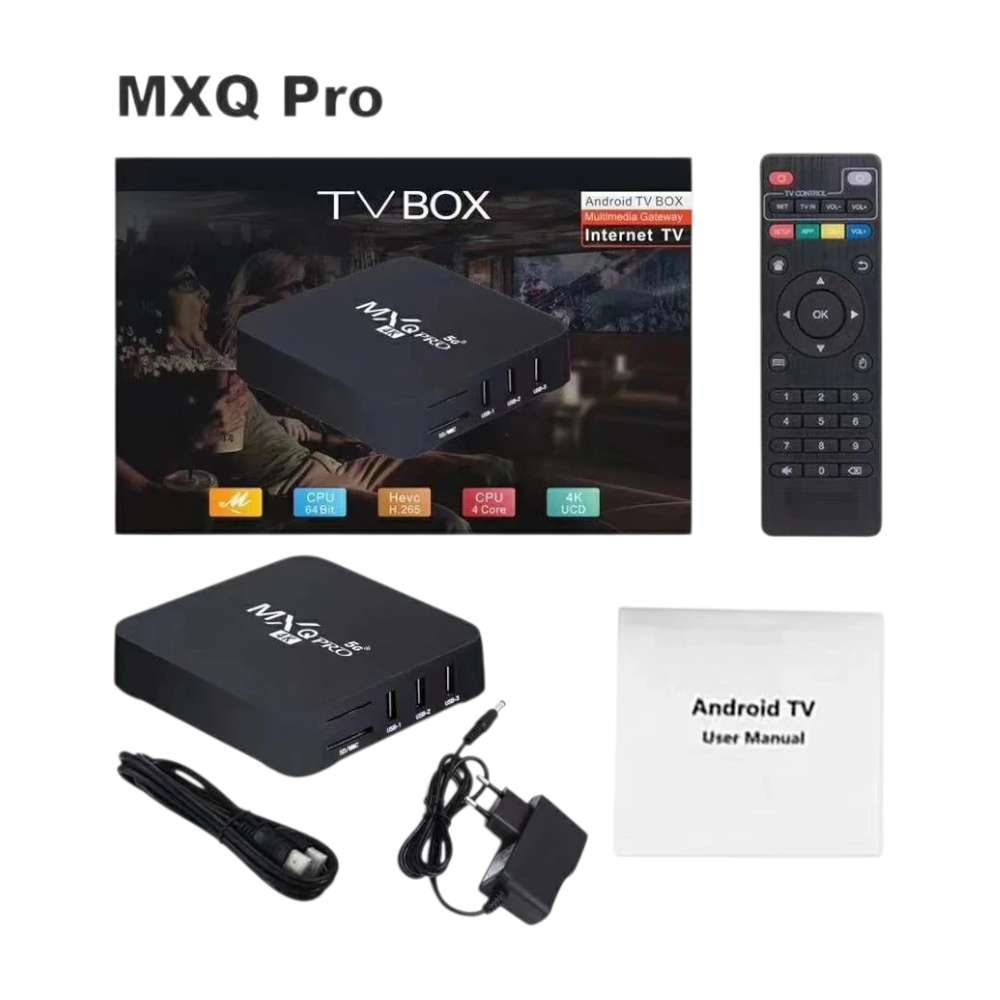
MXQ Android TV Box is a compact media device that lets you add smart entertainment features to a compatible television. With 2GB RAM and 16GB ROM, it provides storage for compatible apps and media while giving you a convenient interface for accessing your entertainment setup.
The package includes the remote control, power adapter and HDMI cable, so you have the main accessories needed to connect the TV box to a compatible television and get started.
Turn a Compatible TV into a Smart Entertainment Setup
The MXQ Android TV Box connects to a compatible television through HDMI, providing an Android-based platform for accessing supported applications and entertainment services.
Instead of relying only on the television’s built-in features, an external TV box gives you another way to access apps and digital content.
The actual apps and streaming services available will depend on the Android software, compatibility and the services you choose to install or use.
2GB RAM and 16GB ROM
The MXQ comes with 2GB RAM and 16GB ROM.
The 2GB RAM provides the device’s working memory for running its Android environment and compatible applications, while the 16GB ROM provides internal storage for the operating system, apps and other supported files.
| Specification | Details |
|---|---|
| Product type | Android TV Box |
| RAM | 2GB |
| Internal storage | 16GB ROM |
| Connectivity to TV | HDMI |
| Remote control | Included |
| Power adapter | Included |
| HDMI cable | Included |
Remote Control Included
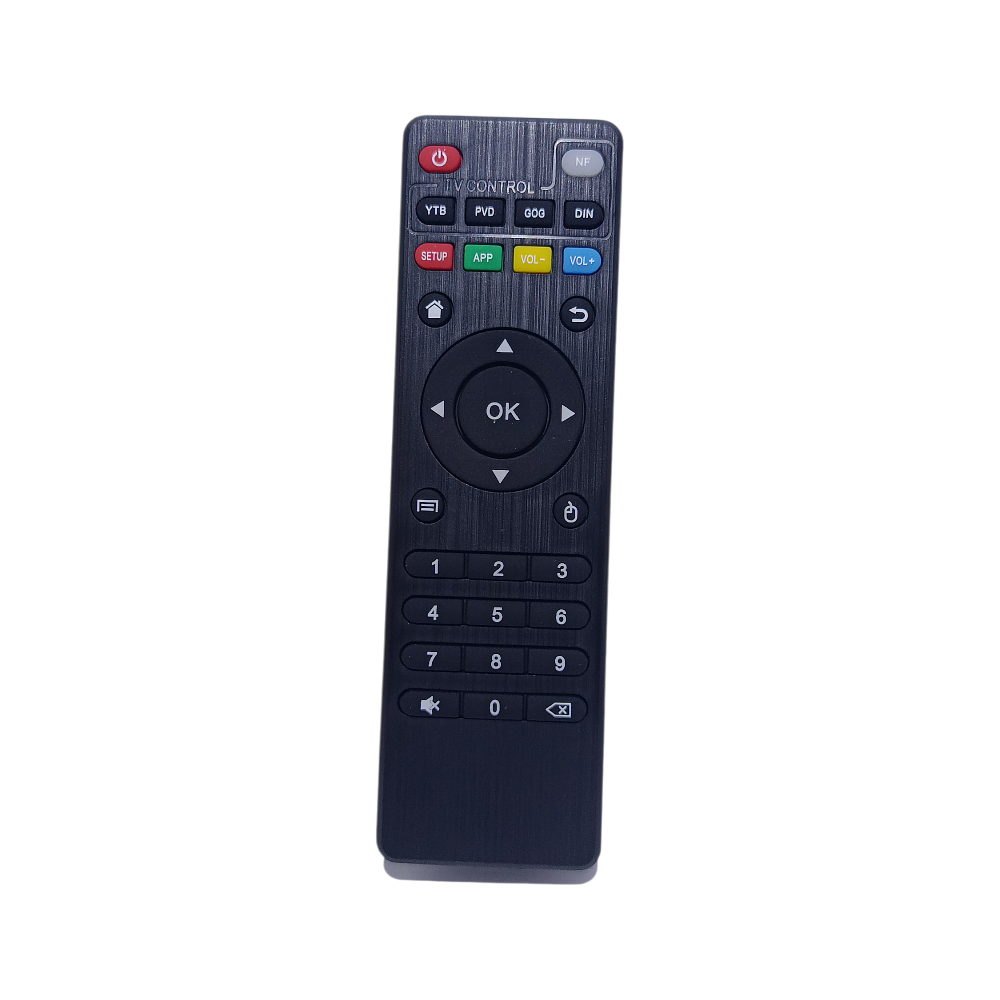
The MXQ Android TV Box comes with a remote control, allowing you to operate the TV box from your viewing position.
A dedicated remote makes navigating the Android interface more convenient than having to interact directly with the box.
This is particularly useful when the TV box is connected to a television in the living room, bedroom or another entertainment area.
HDMI Cable Included
An HDMI cable is included with the MXQ TV Box.
HDMI provides the connection between the TV box and a compatible television or display. Having the cable included means you do not need to purchase an HDMI cable separately just to make the basic connection.
Connect the TV box to an available compatible HDMI input on your television, connect the supplied power adapter and then use the remote to operate the device.
Power Adapter Included
The package also includes a power adapter for powering the TV box.
This means the main accessories supplied with the product include the TV box itself, remote control, power adapter and HDMI cable.
| Package Contents | Included |
|---|---|
| MXQ Android TV Box | ✓ |
| Remote control | ✓ |
| Power adapter | ✓ |
| HDMI cable | ✓ |
16GB Internal Storage
The 16GB ROM provides internal storage within the TV box.
Storage is useful for the Android system, compatible applications and supported files. Keep in mind that some of the internal storage is occupied by the operating system and pre-installed software, so the full 16GB will not necessarily be available for additional apps and files.
This amount of storage is suitable for customers looking for a basic Android TV box rather than a device specifically designed around very large local media collections.
Suitable for Home Entertainment
The MXQ can be used as part of a home entertainment setup where a compatible television has an available HDMI connection.
| Where It Can Be Used | Example |
|---|---|
| Living room | Home entertainment |
| Bedroom | Secondary TV setup |
| Office | Compatible display |
| Guest room | Additional entertainment setup |
| Home media setup | Android-based media access |
The device’s usefulness will depend on the television, internet connection and applications being used with it.
Easy Basic Setup
Setting up the MXQ Android TV Box is straightforward.
Connect the supplied HDMI cable between the TV box and a compatible HDMI input on your television. Connect the supplied power adapter, switch the television to the appropriate HDMI input and use the remote control to navigate the device.
Once connected, you can configure the Android TV box and install or access compatible applications according to your requirements.
Compact Android Media Device
The MXQ is designed as a small external media box rather than a large entertainment system.
Its compact form makes it easy to position alongside a television or other home entertainment equipment. The supplied remote also means you can control the device without having to reach for the box during normal operation.
A Practical Android TV Box
The MXQ Android TV Box combines 2GB RAM, 16GB ROM, an included remote, power adapter and HDMI cable in one package.
It is a practical option for customers who want an external Android-based media device for a compatible television and prefer to receive the essential connection accessories together.
Before purchasing, make sure your television or display has a compatible HDMI input and that the applications or streaming services you intend to use support the device’s Android environment.


 No products in the cart.
Reviews
There are no reviews yet.